搜书大师原版
资讯阅读
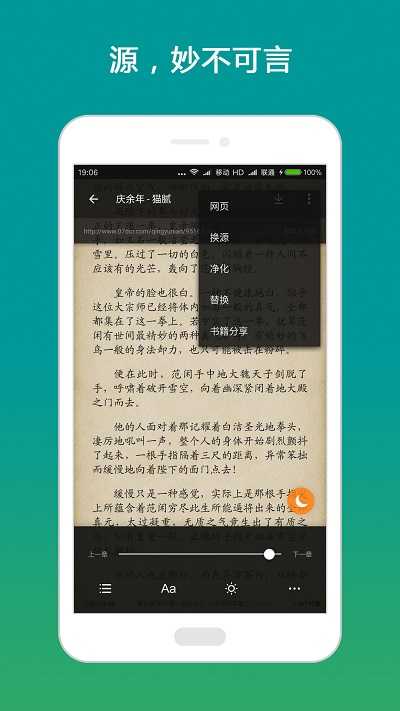
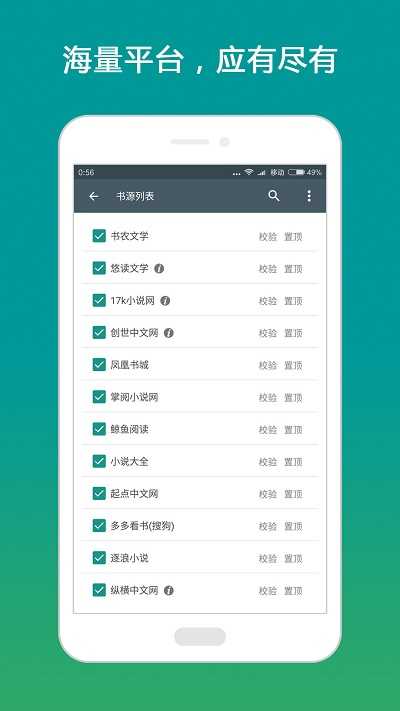
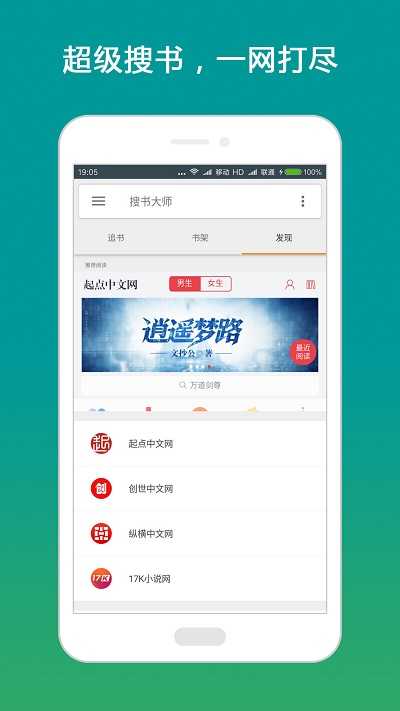
搜书大师是一款好用的阅读类工具,不仅储备了数量庞大的小说内容资源,还支持用户自行添加对应的书源,完成添加操作之后,就能够阅读其他平台站点上的小说内容,有这方面兴趣的朋友完全可以亲自上手试试看!
1.轻松拦截广告
高效筛除垃圾广告,给你营造干净舒心的使用氛围,彻底阻断各类垃圾消息的反复侵扰。
2.海量书源,精准查找
依托搜索技术聚合全平台资源,助力你高效定位所需的各类相关书籍。
3.离线阅读,省心省流量
断网也能轻松阅读,不再担心流量偷跑,随时随地享受爽文。
4.书籍动态随手掌握
实时追踪章节更新动态,帮你随时掌握书籍最新动向,第一时间获取并查看相关内容。
1、https://cdn.jsdeliVR.net/gh/yeyulingfeng01/yuedu.github.io/yuedu3.0-20210105.json
2、https://cdn.jsdelivr.net/gh/yeyulingfeng01/yuedu.github.io@1.1/202003.json资源访问地址:https://cdn.jsdelivr.net/gh/yeyulingfeng01/yuedu.github.io@1.1/202003.json
3、https://cdn.jsdelivr.net/gh/yeyulingfeng01/yuedu.github.io@1.1/202003-2.txt资源访问路径:https://cdn.jsdelivr.net/gh/yeyulingfeng01/yuedu.github.io@1.1/202003-2.txt
4、https://cdn.jsdelivr.net/gh/yeyulingfeng01/yuedu.github.io/yueduRSS-20210105.json
5、https://cdn.jsdelivr.net/gh/yeyulingfeng01/yuedu.github.io@1.1/202003-2.txt资源链接:https://cdn.jsdelivr.net/gh/yeyulingfeng01/yuedu.github.io@1.1/202003-2.txt
6、https://gitee.com/duandaxei/yuedu/raw/master/yd.json资源链接地址为:https://gitee.com/duandaxei/yuedu/raw/master/yd.json
7、https://cdn.jsdelivr.net/gh/yeyulingfeng01/yuedu.github.io@1.1/202003-1.txt资源链接地址:https://cdn.jsdelivr.net/gh/yeyulingfeng01/yuedu.github.io@1.1/202003-1.txt
8、https://cdn.jsdelivr.net/gh/yeyulingfeng01/yuedu.github.io/yuedu2.0-20210105.json资源链接地址:https://cdn.jsdelivr.net/gh/yeyulingfeng01/yuedu.github.io/yuedu2.0-20210105.json
9、https://cdn.jsdelivr.net/gh/laoyerror/laoyerror.github.io/ameng.json3
10、https://cdn.jsdelivr.net/gh/yeyulingfeng01/yuedu.github.io@1.1/202003.txt资源链接:https://cdn.jsdelivr.net/gh/yeyulingfeng01/yuedu.github.io@1.1/202003.txt
11、https://gedoor.github.io/MyBookshelf/bookSource.json资源链接地址:https://gedoor.github.io/MyBookshelf/bookSource.json
12、http://www.yckceo.com/yuedu/shuyuans/json/id/96.json
13、https://cdn.jsdelivr.net/gh/yeyulingfeng01/yuedu.github.io@1.1/202003-2.txt
14、http://www.yckceo.com/yuedu/shuyuans/json/id/94.json相关访问地址为:http://www.yckceo.com/yuedu/shuyuans/json/id/94.json
15、http://www.yckceo.com/yuedu/shuyuans/json/id/100.json相关资源链接:http://www.yckceo.com/yuedu/shuyuans/json/id/100.json
16、https://www.yckceo.com/yuedu/shuyuans/json/id/77.json
17、https://gedoor.github.io/MyBookshelf/bookSource.json相关链接地址:https://gedoor.github.io/MyBookshelf/bookSource.json
18、https://www.yckceo.com/d/bac9c14ed62fd50dbba3ff0f56825cdc相关资源链接地址为:https://www.yckceo.com/d/bac9c14ed62fd50dbba3ff0f56825cdc
19、https://cdn.jsdelivr.net/gh/yeyulingfeng01/yuedu.github.io@1.1/202003-1.txt
20、http://www.yckceo.com/yuedu/shuyuans/json/id/95.json
21、https://cdn.jsdelivr.net/gh/yeyulingfeng01/yuedu.github.io@1.1/202003.json
22、https://cdn.jsdelivr.net/gh/yeyulingfeng01/yuedu.github.io@1.1/202003.txt
23、http://txfile-30121.sz.gfp.tencent-cloud.com/1622198704336_3647656_5a51c6ab27a3ccaf3005c72db703bb7c.json
24、https://cdn.jsdelivr.net/gh/yeyulingfeng01/yuedu.jithub.io@1.1/202003.json
25、http://www.yckceo.com/yuedu/shuyuans/json/id/97.json
1、第一步先打开搜书大师应用,在书架页面点击页面上的“+”形图标。
2、点击加号图标后会跳转至文件选择页面,在该页面点击左上角的“文件夹”选项,选定对应的存储位置即可。
3、定位到你想要导入的文件并将其选中,接着点选页面下方的添加至书架选项,在当前弹出的操作界面里设置好自定义的书架名称后,再点击确认按钮即可。
4、导入后在上方显示导入数量和文件名;
5、导入操作全部结束后,退回到书架页面,此时在书架中就可以找到刚才成功导入的对应文件了。
1、多源多格式,上百个平台,丰富格式支持
2、采用浏览器技术,闪电搜书
4、专业技术,设置丰富,极佳体验
5、一站式阅读,节省时间和钱包
6、配合讯飞语音引擎,解放你双手
7、丰富的选项,带来舒爽的阅读体验


 龙虾部署让openclaw接入本地教程!
近期”龙虾“热度暴涨,openclaw这款被大众称作"小龙虾
龙虾部署让openclaw接入本地教程!
近期”龙虾“热度暴涨,openclaw这款被大众称作"小龙虾
 WorkBuddy免部署腾讯版“小龙虾”上线,下载即用!
3月9日,腾讯云正式发布全场景AI智能体WorkBuddy,
WorkBuddy免部署腾讯版“小龙虾”上线,下载即用!
3月9日,腾讯云正式发布全场景AI智能体WorkBuddy,
 龙虾部署安装教程!龙虾部署条件详解!
此文章中提到的在最近科技圈爆火的“龙虾&rdqu
龙虾部署安装教程!龙虾部署条件详解!
此文章中提到的在最近科技圈爆火的“龙虾&rdqu
 龙虾部署调动openclaw用豆包模型生成视频详解!
OpenClaw因红色龙虾图标被网友亲切称为"小龙虾",是一
龙虾部署调动openclaw用豆包模型生成视频详解!
OpenClaw因红色龙虾图标被网友亲切称为"小龙虾",是一
 千问春节瓜分30亿红包火热进行,第二阶段即将开启!
相信经过几天的互联网ai红包的攻击,很多小伙伴都收获满满,而
千问春节瓜分30亿红包火热进行,第二阶段即将开启!
相信经过几天的互联网ai红包的攻击,很多小伙伴都收获满满,而
 千问红包怎么领?活动时间与攻略详解
据阿里云数据显示,千问在2月6日上线的「30 亿免单」活动,
千问红包怎么领?活动时间与攻略详解
据阿里云数据显示,千问在2月6日上线的「30 亿免单」活动,